Modern AAA PC and console titles—such as Call of Duty: Warzone, Baldur's Gate 3, Cyberpunk 2077, and upcoming open-world releases—routinely demand between 90GB and 150GB of raw storage. When queuing a 100GB game, players frequently encounter an infuriating discrepancy: why does an advertised 100 Mbps broadband connection take nearly two and a half hours instead of downloading 100 MB every second?
To understand real-world download durations, we must break down the underlying network mechanics: the mathematical 8-to-1 ratio between Megabits per second (Mbps) and Megabytes per second (MB/s), TCP/IP packet framing overhead, and the hardware-level bottleneck of real-time client-side decompression executed by Steam, Epic Games Store, and PlayStation Network (PSN). You can verify your exact network connection speed using our free Interactive Download Time Calculator.
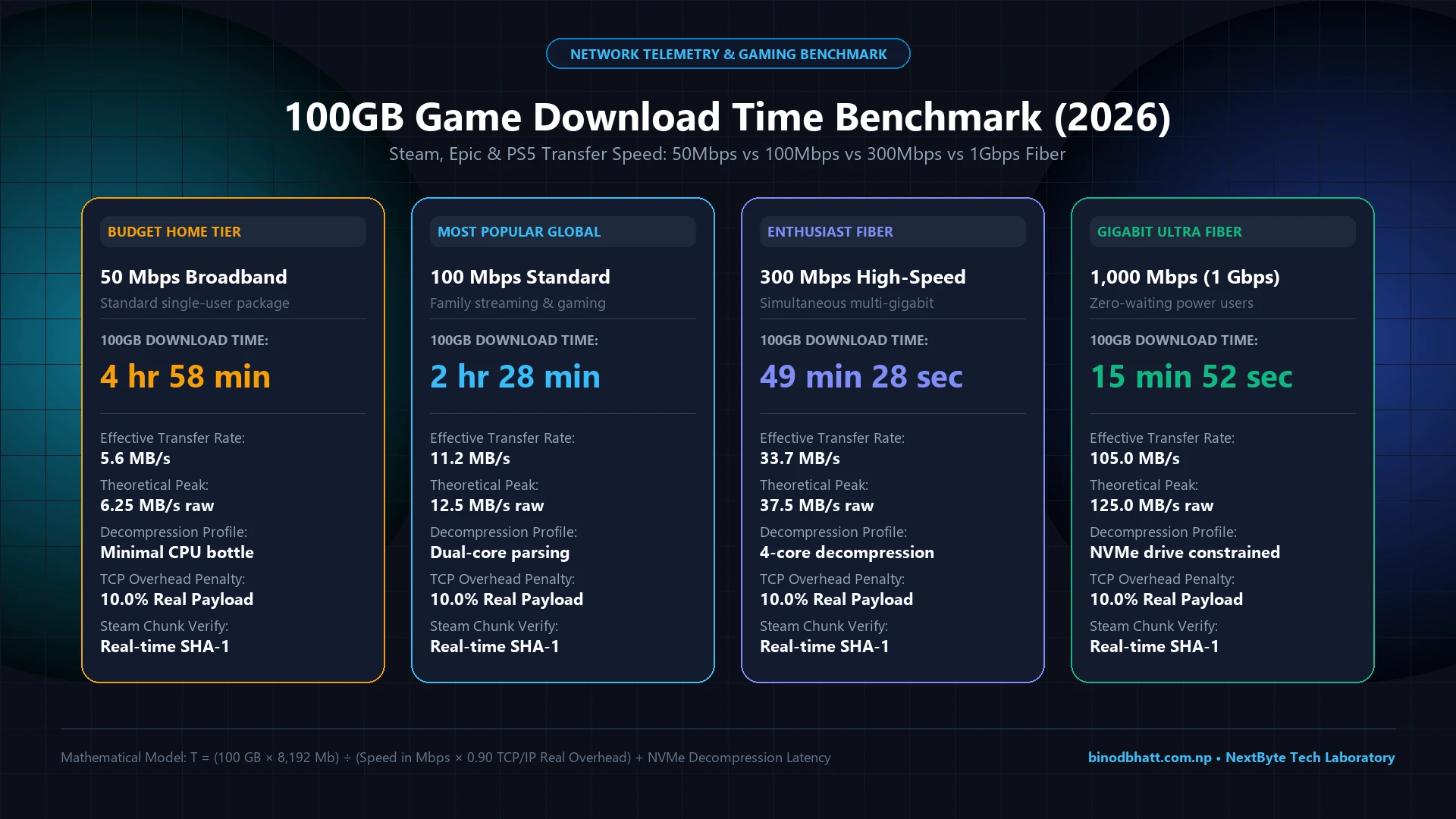
| Broadband Tier | Theoretical Speed | Real Transfer Rate (-10% TCP) | 100GB Real Download Time | Hardware Limiting Factor |
|---|---|---|---|---|
| 30 Mbps DSL / Fiber | 3.75 MB/s | 3.37 MB/s | 8 hr 14 min | Network Bandwidth Bound |
| 50 Mbps Broadband | 6.25 MB/s | 5.62 MB/s | 4 hr 58 min | Network Bandwidth Bound |
| 100 Mbps Standard | 12.50 MB/s | 11.25 MB/s | 2 hr 28 min | Dual-core CPU Decompression |
| 200 Mbps Fiber | 25.00 MB/s | 22.50 MB/s | 1 hr 14 min | Multi-core CPU Decompression |
| 300 Mbps High-Speed | 37.50 MB/s | 33.75 MB/s | 49 min 28 sec | Storage Write Pacing (SATA SSD) |
| 500 Mbps Gaming Tier | 62.50 MB/s | 56.25 MB/s | 29 min 40 sec | NVMe SSD Sustained Write |
| 1,000 Mbps (1 Gbps) | 125.00 MB/s | 105.00 MB/s | 15 min 52 sec | CPU Decompression & NVMe Cache |
1. The Mathematical 8-to-1 Rule: Megabits (Mbps) vs Megabytes (MB/s)
The most common reason for confusion among PC builders and console gamers is unit nomenclature. Internet Service Providers (ISPs) advertise bandwidth in Megabits per second (Mbps with a lowercase 'b'), while game launchers report download speeds in Megabytes per second (MB/s with a capital 'B'):
2. Why Real Downloads Take 10% to 15% Longer (Network Overhead)
In actual network telemetry, you will never achieve the raw mathematical minimum. Three physical layers reduce throughput:
- TCP/IP Packet Header Encapsulation: Every data packet sent across the public internet contains Ethernet frames, IP headers (20 bytes), and TCP headers (20 to 32 bytes). Acknowledgement packets (ACKs) consuming upstream bandwidth account for a 2.5% to 5% baseline reduction.
- Wi-Fi 5/6 Latency & Jitter: Wireless connections subject to 5GHz channel congestion, beamforming reflections, and MIMO interference suffer between 3% and 8% packet retransmission penalties. Switching to a direct Cat6 Gigabit Ethernet cable immediately eliminates this loss.
- CDN Edge Route Throttling: Game servers do not deliver unlimited bandwidth. During global launch windows (such as patch days), content delivery networks (Akamai, Cloudflare, Fastly, AWS CloudFront) rate-limit individual client streams to avoid peering saturation.
3. The Steam Architecture Factor: CPU Decompression vs Network Speed
Unlike direct HTTP browser downloads, Steam does not transmit raw game files across the wire. To save multi-terabyte CDN bandwidth costs, Valve compresses game data into encrypted, LZMA2-compressed chunks (typically 1MB each).
Game & File Download Time Calculator
Calculate exact ETA for GTA 6, Warzone, Steam games, and 4K media across 30 Mbps to 1 Gbps fiber plans with 10% TCP/IP real-world overhead.
When Steam downloads a game, your computer executes three simultaneous pipelines:
- Network Ingestion: Encrypted chunks are streamed over HTTPS to system memory.
- CPU Decompression: Your processor continuously unpacks LZMA2 archives in multi-threaded pipelines. On a system running an older 4-core CPU or thermal-throttled laptop, CPU usage hits 100%, causing Steam's network graph to flatline to 0 MB/s while the processor catches up. If you experience kernel hangs during heavy drive activity, consult our diagnostic guide on Fixing DPC Watchdog Violation BSOD Crashes.
- Disk Serialization: Uncompressed assets are written sequentially to storage. On mechanical HDDs (which top out at 80 to 140 MB/s sequential writes), the drive cannot sustain gigabit download rates, causing write-queue stalls. A modern PCIe 4.0 NVMe SSD is essential to sustain transfer speeds exceeding 300 Mbps.
4. Step-by-Step Optimization to Cut Game Download Times
- Change Steam Download Region: Open Steam → Settings → Downloads → Download Region. If your local node is congested during peak evening hours, select a nearby major regional hub with direct fiber peering.
- Disable Windows Delivery Optimization: Windows 10/11 peer-to-peer update sharing can saturate upstream bandwidth. Go to Settings > Windows Update > Advanced Options > Delivery Optimization and toggle Allow downloads from other PCs to Off.
- Enable Quality of Service (QoS) on Your Router: Configure your home router to prioritize traffic on port 27015-27050 (Steam) and port 80/443, ensuring that background video streaming on smart TVs does not cannibalize gaming bandwidth.