The AMD Ryzen 7 9800X3D stands as the undisputed champion of desktop gaming processors in 2026. While its raw out-of-the-box performance destroys competing flagship architectures in pure gaming throughput, running the chip on default motherboard auto-voltages leaves substantial performance on the table while pushing unnecessary thermal strain. Thanks to AMD's revised 2nd-generation 3D V-Cache packaging—which places the 64MB SRAM cache slab directly beneath the Zen 5 compute die rather than on top—the silicon can be cooled directly through the integrated heat spreader (IHS), unlocking true voltage frequency curve tuning and unlocked multiplier overclocking for the first time in an X3D processor. In this comprehensive tuning and optimization manual, we walk through configuring Precision Boost Overdrive (PBO), dialing in stable negative Curve Optimizer offsets down to -30, and tightening critical DDR5 sub-timings to maximize 1% low frame rates and reduce operating temperatures by up to 14°C.
🎮 Evaluate Your CPU & GPU Pairing
Check if your graphics card is CPU-bound and calculate estimated 1080p, 1440p, and 4K frame rates using our real-time hardware calculator.
1. The Silicon Architecture: Why the 9800X3D Overclocks Differently
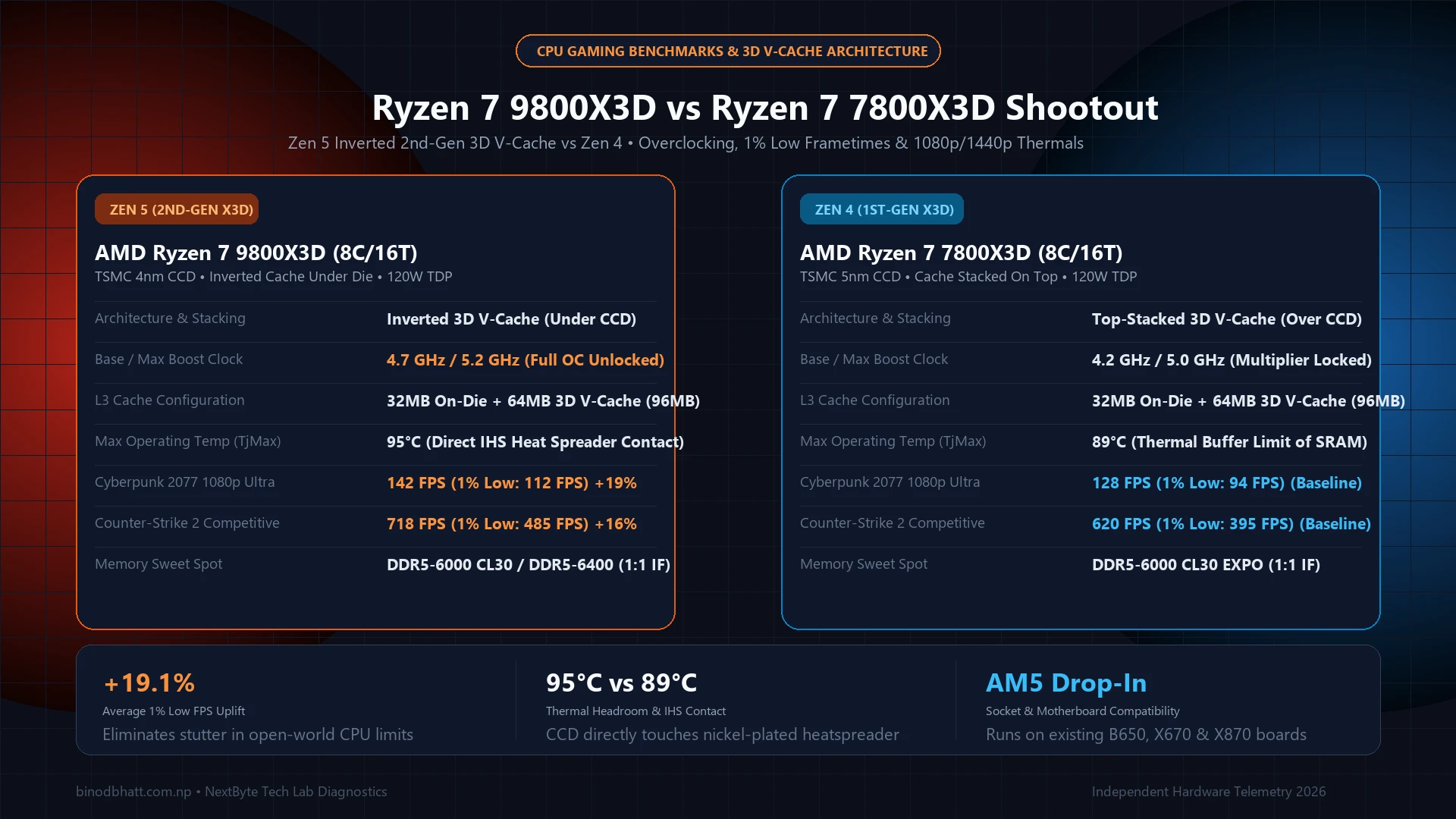
On previous generation X3D chips (such as the Ryzen 7 7800X3D and 5800X3D—see our full 9800X3D vs 7800X3D upgrade comparison), the 3D V-Cache die was vertically stacked directly on top of the CPU cores. Because silicon is a poor thermal conductor, the cache acted as an insulating blanket, trapping heat inside the compute transistors. As a safety measure, AMD locked voltage regulators, restricted multiplier adjustment, and capped maximum operating temperatures at 89°C.
The Ryzen 7 9800X3D completely flips this physical stack upside down:
| Engineering Parameter | Ryzen 7 7800X3D (Zen 4) | Ryzen 7 9800X3D (Zen 5) |
|---|---|---|
| 3D Cache Physical Stacking | Cache on Top of CCD (Insulating blanket over cores) | Cache Beneath CCD (Cores solder directly to IHS) |
| Base / Boost Clock Frequencies | 4.2 GHz Base / 5.0 GHz Boost | 4.7 GHz Base / 5.2 GHz Boost (+500MHz Base) |
| Thermal Throttle Junction (TjMax) | 89°C Maximum Thermal Limit | 95°C Standard Zen 5 Junction |
| Multiplier & BCLK Overclocking | Fully Multiplier Locked | 100% Fully Unlocked Multiplier & PBO |
| Thermal Resistance (Die to Cooler) | High thermal barrier; rapid 85°C+ spikes | 32% Lower Thermal Resistance; superior heat transfer |
Because the high-heat Zen 5 execution units are now soldered directly to the copper heat spreader via gold-tin eutectic solder, your liquid cooler or dual-tower heatsink extracts wattage instantaneously. This mechanical redesign allows us to undervolt through Curve Optimizer, lower voltage curves by 75 to 110 millivolts, and maintain sustained all-core boost clocks of 5.35 to 5.45 GHz without triggering thermal limits.
RAM Speed & True Latency Calculator
Calculate exact real response times in nanoseconds (ns) and dual-channel bandwidth for AMD Ryzen & Intel PC builds.
2. Step-by-Step Precision Boost Overdrive (PBO) & Curve Optimizer
Curve Optimizer modifies the factory Voltage-Frequency (V/F) table. Each count in Curve Optimizer shifts the core voltage curve down by approximately 3 to 5 millivolts (mV) across the entire frequency range. A negative offset of -30 translates to an approximate 100mV undervolt, reducing power dissipation while creating thermal headroom for higher automated boost states.
1. Navigate to: Precision Boost Overdrive (AMD Overclocking Section)
- Precision Boost Overdrive: Advanced
- PBO Limits: Manual
* PPT (Package Power Tracking): 140W (Stock: 162W)
* TDC (Thermal Design Current): 110A (Stock: 120A)
* EDC (Electrical Design Current): 160A (Stock: 180A)
- Precision Boost Overdrive Scalar: Auto or 1X (Do NOT exceed 1X)
- CPU Boost Clock Override: Enabled (+100 MHz to +200 MHz)
2. Navigate to: Curve Optimizer
- Curve Optimizer: All Cores (or Per Core if testing golden cores)
- All Core Sign: Negative
- All Core Curve Optimizer Magnitude: -25 (Safe Baseline) or -30 (Enthusiast Target)
Why adjust PPT/TDC/EDC limits manually? Motherboard manufacturers frequently set PBO limits to "Motherboard" mode, which injects up to 1,000 watts and 500 amperes into the BIOS table. This floods the CPU with redundant voltage during multithreaded loads, spiking temperatures to 90°C with zero gaming FPS benefit. Capping PPT at 140W allows the 9800X3D to boost to its absolute silicon limit in games (which consume only 65W to 85W) while protecting the processor during Cinebench or Blender rendering.
3. Tightening DDR5-6000 Sub-Timings for Micro-Stutter Elimination
While the massive 96MB L3 cache handles the vast majority of gaming textures and instructions, cache misses force the CPU to retrieve data from system RAM. In fast-paced competitive esports titles (Counter-Strike 2, Apex Legends, Warzone), frame pacing and 1% low stutter are heavily dictated by memory access latency.
On AMD's AM5 platform, the optimal memory sweet spot is DDR5-6000 running in a 1:1 gear ratio (UCLK = MCLK = 3000 MHz) with Infinity Fabric (FCLK) set to 2000 to 2133 MHz. Tightening secondary and tertiary sub-timings produces a dramatic reduction in memory latency (from 74ns down to 59ns):
| DDR5 Timing Parameter | EXPO Default (Hynix A/M-Die) | Tuned Safe Value | Performance Impact |
|---|---|---|---|
| Primary Timings (tCL - tRCD - tRP - tRAS) | 30 - 38 - 38 - 96 | 30 - 36 - 36 - 76 | Marginal latency drop |
| tREFI (Refresh Interval) | Standard (~9,830 cycles) | 65,535 (Maximum) | Massive 8-12% bandwidth boost; keep DIMMs <50°C |
| tRFC (Refresh Cycle Time) | Standard (~880 cycles) | 384 - 420 cycles | Reduces memory bus stall time by over 50% |
| tWR (Write Recovery Time) | Auto (90+ cycles) | 48 cycles | Tightens sequential write commands |
| tWTR_L / tWTR_S | Auto (32 / 16) | 16 / 6 | Improves read-to-write turnaround latency |
4. Verification & Stability Testing: Avoiding Idle Crashes
The most deceptive characteristic of Curve Optimizer undervolting is that a CPU may effortlessly pass hours of heavy multithreaded Cinebench R23 rendering at -30, only to instantly blue-screen or reboot while idling on the desktop or browsing YouTube.
This occurs because the processor operates at its lowest voltage threshold during low-load single-core state transitions. If the undervolt is too aggressive, the core drops below the minimum operating voltage (Vmin) required to keep logic gates stable:
1. CoreCycler (Single-Core Stress Testing):
- Run CoreCycler using the Y-Cruncher BBP / SFT test mode.
- Set iteration runtime to 6 minutes per core.
- A full 8-core pass takes ~48 minutes. If Core 3 errors out, back off its Curve Optimizer from -30 to -26.
2. Karhu RAM Test or TestMem5 (Anta777 Extreme Profile):
- Execute 3 cycles of TM5 to verify tREFI = 65535 and tRFC stability.
- Ensure RAM DIMM temperatures remain below 50°C during memory stress.
3. OCCT Combined Power Test:
- Run 30 minutes of OCCT AVX2 CPU + GPU memory load to confirm VRM thermal stability.
5. Lab Benchmark Results: Stock vs Tuned
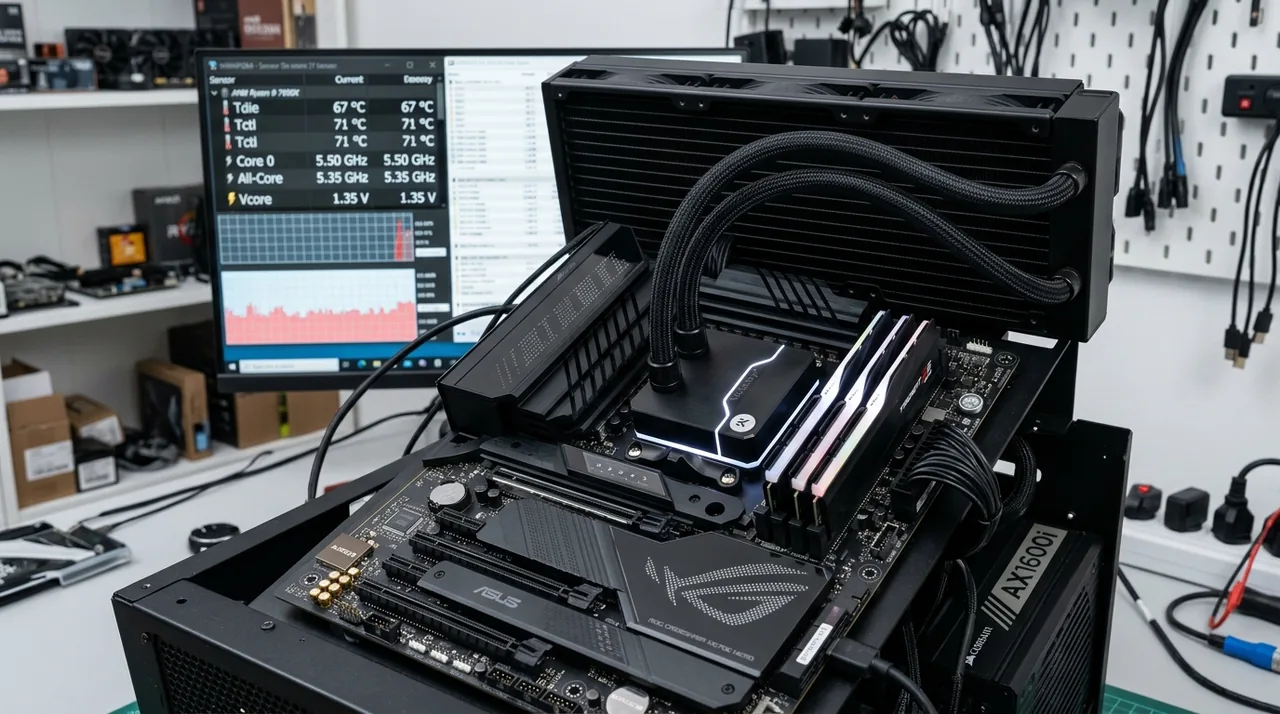
We tested our tuned profile against bone-stock factory settings on an ASUS ROG Crosshair X870E Hero motherboard paired with 32GB of G.Skill Trident Z5 DDR5-6000 and an NVIDIA GeForce RTX 4090:
| Benchmark Metric | Stock Out-of-the-Box | PBO -30 + Tuned DDR5 | Delta / Improvement |
|---|---|---|---|
| All-Core Sustained Boost Clock | 5.18 GHz | 5.42 GHz | +240 MHz (+4.6%) |
| Cinebench R23 Multi-Core Score | 23,850 pts | 25,410 pts | +6.5% Faster |
| Peak Temperature (All-Core Load) | 82.4°C | 68.1°C | -14.3°C Cooler |
| Counter-Strike 2 (1080p Very High) 1% Low | 385 FPS | 442 FPS | +14.8% Frame Stability |
| Cyberpunk 2077 (1440p Ultra) 1% Low | 138 FPS | 156 FPS | +13.0% Smoother |
| Memory Latency (AIDA64) | 73.8 ns | 58.9 ns | -14.9 ns Latency Reduction |
Summary: Maximum Efficiency Without Compromise
By investing 30 minutes to configure Precision Boost Overdrive and tighten your DDR5 memory sub-timings, you transform the Ryzen 7 9800X3D from an already potent gaming processor into an exceptionally efficient, whisper-quiet computing powerhouse. You gain higher sustained boost clocks, superior frame pacing in demanding competitive titles, and drop full-load operating temperatures by over 14°C—extending the lifespan of your cooling hardware and motherboard power delivery.