For programmers, a keyboard is not merely a peripheral; it is the primary interface between thought and execution. A sub-par membrane keyboard not only slows down your typing speed but can lead to long-term repetitive strain injuries (RSI). In 2026, the mechanical keyboard market offers unparalleled customization, allowing developers to curate their exact preferred tactile feedback, acoustic profile, and layout. Here is the ultimate guide to choosing the best mechanical keyboard for coding.
Understanding Switch Types for Typing Intensive Work
The switch is the heart of the mechanical keyboard. As a programmer, you will likely be bottoming out thousands of keys a day. Selecting the right switch involves balancing tactile feedback against noise (especially if you work in an open office).
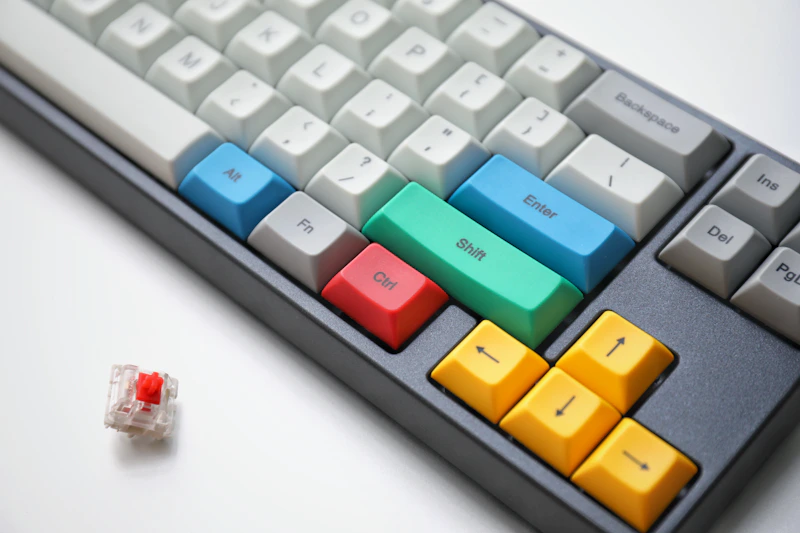
- Tactile (e.g., Cherry MX Brown, Boba U4T): The gold standard for typing. They offer a distinct "bump" when the keystroke registers, preventing typos and providing satisfying feedback without the loud click.
- Linear (e.g., Gateron Yellow, Cherry MX Red): Smooth from top to bottom. Preferred by gamers, but many developers love the buttery feel of well-lubed linears, especially to reduce finger fatigue.
- Clicky (e.g., Kailh Box Jade, Cherry MX Blue): Features a bump and an audible click. Extremely satisfying to type on, but likely to make your coworkers despise you.
Hot-Swap PCBs and Keycap Profiles
Do not buy a keyboard in 2026 unless it has a hot-swappable PCB. Hot-swap sockets allow you to pull out switches and push new ones in using a simple tool—no soldering iron required. This means if you get tired of linear switches, you can swap to tactiles in 10 minutes.
Keycap profiles also drastically affect typing feel. Standard keyboards use Cherry or OEM profiles, which are sculpted and relatively low. However, vintage-inspired profiles like SA or MT3 cup your fingers aggressively, which many developers claim improves their accuracy during long Vim or VS Code sessions. High-quality PBT plastic keycaps are essential to prevent that greasy, shiny look that ABS plastic develops over time.
Top Picks for Programmers
1. Keychron Q1 Pro (Best Overall)
Priced at roughly $199 USD, the Keychron Q1 Pro is a wireless, 75% layout custom keyboard wrapped in a full aluminum CNC machined body. It bridges the gap between custom enthusiast boards and consumer readiness. The 75% layout retains the arrow keys and a function row—crucial for stepping through debuggers—while saving desk space. It supports QMK/VIA natively via Bluetooth, making it an absolute powerhouse for macro management.
RAM Speed & True Latency Calculator
Calculate exact real response times in nanoseconds (ns) and dual-channel bandwidth for AMD Ryzen & Intel PC builds.
2. Glorious GMMK Pro (Best for Enthusiast Tinkering)
At $169.99 (barebones), the GMMK Pro popularized the gasket-mount 75% board. Gasket mounting places sound-dampening foam between the plate and the case, resulting in a softer typing feel and a deeper, more premium acoustic profile (the sought-after "thock"). It features a rotary encoder (volume knob) which can be reprogrammed to scroll through code or scrub timelines.
3. Ducky One 3 & Leopold FC900R (Best Pre-built Classic Layouts)
For developers working in enterprise environments who need a numpad for IP addresses or data entry, a full-size or TKL (Tenkeyless) board is preferable. The Ducky One 3 ($130) features fantastic internal acoustics and hot-swap capabilities. The Leopold FC900R ($119), while lacking hot-swap, remains legendary for its impeccable build quality and best-in-class factory sound dampening.
4. KBDfans Tofu65 2.0 (Best Premium Minimalist)
If you want a heavier, premium aesthetic without a function row (relying on layers instead), the 65% layout of the Tofu65 is stunning. It is compact, forces your hands to stay on the home row, and utilizes QMK firmware to map missing keys under your fingertips.
The Magic of QMK/VIA and Programmable Layers
The true superpower of a programming keyboard is QMK (Quantum Mechanical Keyboard) or its graphical frontend, VIA. Unlike proprietary software (like Razer Synapse or Corsair iCUE) that must run in the background, QMK flashes your keymaps directly to the keyboard's microcontroller. You can plug it into any PC, Mac, or Linux machine, and your macros work instantly.
Programmable layers allow you to map keys to multiple functions. For example, holding the Caps Lock key could turn your H, J, K, L keys into arrow keys (Vim style), meaning your fingers never have to leave the home row to navigate code.
Ergonomic Considerations
If wrist pain is already an issue, consider a split ortholinear keyboard like the ZSA Moonlander or the ErgoDox EZ. These boards separate the left and right halves at shoulder width, opening up your chest and preventing ulnar deviation. While they have a steep learning curve, many senior developers swear they have saved their careers by eliminating RSI.
| Keyboard | Layout | Hot-Swap | Wireless | Approx Price |
|---|---|---|---|---|
| Keychron Q1 Pro | 75% | Yes | Yes | $199 |
| GMMK Pro | 75% | Yes | No | $169 (Barebones) |
| Ducky One 3 | Full/TKL | Yes | No | $130 |
Overall, investing in a high-quality mechanical keyboard with tactile switches, QMK firmware support, and hot-swap capability will yield massive dividends in your coding comfort and speed over the years.