Windows 11 version 26H2 introduces a security control that quietly rewrites a foundational privilege architecture that has remained unchanged since Windows Vista: User Account Control (UAC). The new Administrator Protection feature does not simply replace UAC's prompt dialog—it replaces the entire token model with a Just-in-Time (JIT) elevation framework authenticated by Windows Hello biometrics or PIN. For security engineers and IT administrators, this is the most consequential Windows privilege model change in nearly two decades, eradicating an entire class of living-off-the-land privilege escalation exploits.
🛡️ Zero Trust & System Security Telemetry
Explore our defensive zero-trust architectural blueprints, firewall hardening protocols, and secure network guides.
1. Why Legacy UAC Has a Fundamental Design Flaw
The original UAC system introduced in Windows Vista operates on a split-token model. When an administrative user logs into a Windows workstation, the Local Security Authority Subsystem Service (LSASS) provisions two access tokens simultaneously:
- Filtered Token (Medium Integrity): Stripped of high-privilege SIDs (such as
S-1-5-32-544Administrators) and advanced privileges. This token runs everyday software like web browsers, Discord, and text editors. - Full Administrative Token (High Integrity): Retains complete administrative SIDs and privileges, but remains dormant in session memory until invoked.
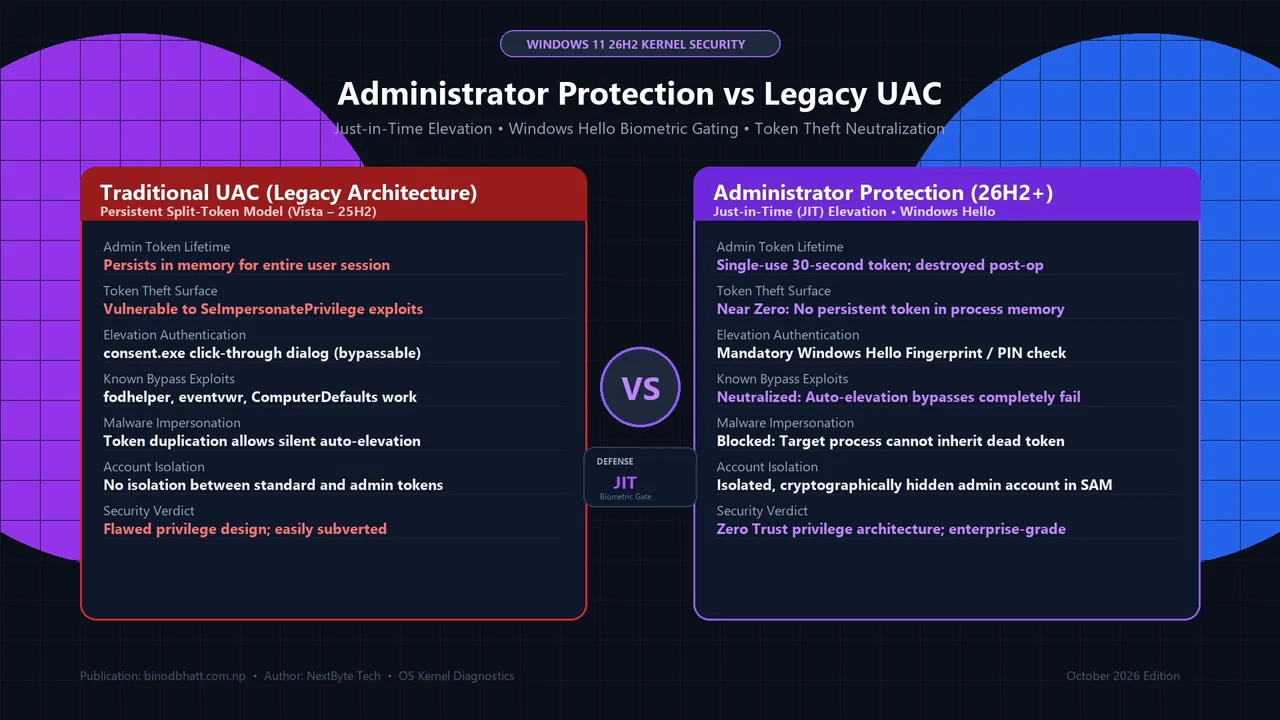
Herein lies the architectural vulnerability: the full administrator token resides continuously in memory throughout the user's interactive logon session. If unprivileged malware gains execution on the system, it does not need to compromise the kernel. Instead, it can exploit trusted auto-elevating binaries (such as fodhelper.exe, eventvwr.exe, or slui.exe) through registry hijacking, duplicate privileged token handles via SeImpersonatePrivilege, or inject code into existing medium-integrity processes to bypass UAC prompts entirely without raising a single security alert.
2. The JIT Elevation Architecture in Windows 11 26H2
Administrator Protection fundamentally scraps the persistent split-token design. When an administrative user logs into Windows 11 26H2 with this feature enabled, Windows never generates a full administrator token. The user runs under a strictly unprivileged standard user identity.
Tech Versus: Side-by-Side Compare Engine
Compare GPUs, CPUs, and Flagship Smartphones head-to-head with GSMArena-style specs, gaming FPS benchmarks, and winner verdicts.
2026 Windows 11 Optimization Cheat Sheet
Download our complete verified cheat sheet with 25+ PowerShell commands, debloating scripts, and service tweaks to get sub-10 second boot times.
When an application requires administrative permissions (such as installing a driver or modifying system files in C:\Windows\System32):
- The application calls the Win32 API
ShellExecuteExwith therunasverb. - The kernel's Application Information Service (AppInfo) intercepts the request and generates a temporary, cryptographically isolated administrative profile in the Security Account Manager (SAM).
- A mandatory secure desktop challenge is presented requiring Windows Hello biometric verification (facial recognition, fingerprint) or a cryptographic hardware PIN backed by the platform TPM 2.0.
- Upon successful biometric verification, Windows synthesizes an ephemeral, single-use access token. This token is valid for a maximum duration of 30 seconds and is bound strictly to the specific target process ID.
- The moment the elevated task concludes or the process terminates, the token is cryptographically destroyed and purged from memory.
| Security Architecture Metric | Legacy Windows UAC (Vista – 25H2) | Administrator Protection (26H2 JIT) | Linux / UNIX Equivalent |
|---|---|---|---|
| Active Token in Memory | Persistent in user session | None (Synthesized JIT on-demand) | None (Unprivileged shell by default) |
| Authentication Challenge | Passive "Yes" button click | Windows Hello Biometrics / TPM PIN | User Password / SSH Key (sudo) |
| Token Lifespan | Entire logon session duration | 30 seconds (or process lifetime) | 15 minutes (default sudo timestamp) |
| Resistance to COM Hijacking | Vulnerable (fodhelper / eventvwr) | 100% Immune (No token to steal) | 100% Immune |
| LSASS Memory Stealing Protection | Requires Credential Guard / RunAsPPL | Native: Token does not exist in LSASS | Native kernel memory isolation |
3. Step-by-Step Configuration: Enabling Administrator Protection
Administrator Protection is disabled by default in early 26H2 consumer builds to maintain backward compatibility with legacy corporate installers. Power users and security engineers can enable it via two verified methods:
Method A: Windows Security GUI
- Open Windows Security from the Start menu or system tray.
- Navigate to Account Protection.
- Locate Administrator Protection and toggle the switch to On.
- Confirm with your Windows Hello biometric prompt or PIN and reboot your computer.
Method B: Elevated Command Line & Registry Deployment
For sysadmins deploying across multi-PC fleets or virtualized test environments, deploy this registry modification:
4. Compatibility Impact: What Might Break?
While Administrator Protection provides enterprise-grade isolation, certain legacy utilities and gaming tools that rely on implicit elevation will require updates:
- Kernel Anti-Cheat Drivers (Older Games): Older anti-cheat systems designed before 2024 that attempt to hook into medium-integrity user sessions to inherit admin rights may fail to launch without manual "Run as Administrator" right-click prompts.
- Automated Backup Scripts (Batch/PowerShell): Scheduled tasks configured to "Run with highest privileges" under standard user credentials will fail unless explicitly provisioned with a dedicated service account or managed gMSA identity.
- Custom Game Mod Managers: Applications modifying
C:\Program Filesfiles on the fly without formal elevation manifests will trigger repeated Windows Hello prompts.
5. The Verdict: The Death of Living-off-the-Land Escalations
For over fifteen years, offensive security professionals and ransomware operators have relied on UAC bypasses as an effortless, zero-cost vector to escalate from initial medium-integrity access to full NT AUTHORITY\SYSTEM control. By shifting to a hardware-signed, biometric Just-in-Time elevation model, Windows 11 26H2 renders the entire catalog of public UAC bypass techniques obsolete. Enabling Administrator Protection is the single most impactful security hardening measure available to modern Windows users.